Reviewers overwhelmingly had a great experience with this company. Customers consistently praise the software for being extremely easy to use, noting that it handles format conversions and removes DRM restrictions smoothly. People deeply appreciate how fast and intuitive the clean interface is, allowing them to effortlessly manage and back up their digital libraries across multiple reading devices.
However, some customers also noted that recent updates to reading platforms can break software compatibility, occasionally causing the program to stop working properly. A few users additionally mentioned that the free trial version is too limited or that certain stubborn files fail to convert as expected.
A must-have tool to protect and manage your Kindle library
After recently losing my job, I needed a reliable way to safeguard my Kindle library—books I’ve collected over time that are important to me for personal growth and professional development.
Epubor has been the perfect solution. It allowed me to quickly and easily download all my Kindle books, back them up on my computer, and convert them into any format I need. The software is intuitive, fast, and works exactly as promised.
What truly stood out to me, beyond the functionality, was the excellent customer service. The team was responsive, helpful, and kind—something that made a big difference during a stressful time.
Having full control over my digital library gives me peace of mind, and I’m deeply grateful for tools like Epubor. Highly recommended to anyone who values their eBook collection!
Great Software to save precious books before they disappear
When this software was given away on GOTD, I jumped on it to see if it was worth the hype they gave it. Sure enough it was and I was happy that I could save my Kindle books to the PC (Personal) and have a licensed software to do so.
Since I redid my computer, I no longer have the GOTD files or the registeration code so I can't use the software anymore but I still think that this software is great once you figure out how to operate it and get it to talk to the Kindle app on your computer.
Having another license would be great, but alas with everything going up except income, I cannot afford a license.
Pros:
Supports multiple formats like Kindle, ePub, PDF, AZW, and more.
Easily removes DRM protection (for books you have the right to read).
Smooth user experience with a simple interface.
Cons:
The free version is limited, and you need to upgrade for full access.
Some protected books may require additional steps to remove restrictions.
Overall, Epubor is a powerful tool for eBook lovers, especially those who want to organize their digital library hassle-free!
Great piece of software. Easy to use, nice looking interface.
Works well!
With the latest Amazon drm changes (and Amazon removing the download option), I've given up on Kindle ebooks (although many titles can still be decrypted).
I hope for Amazon's sake you crack their latest stuff- I've had to switch to only buying ebooks on other platforms, and then removing the drm to put it on my Kindle!
Epubor Nook Converter Software helped me to gain access to my Nook books that I already own so that I can read them on my new Kobo ereader. Thank you so much for the great product and great customer service. Highly recommend!
Poor. Deceptively encourages you to download the software, without telling you that the free trial is extremely limited. Only 3 exports. What a waste of time!
Epubor 回复2025-03-14
The free trail version of Epubor Ultimate only converts 20% of the original content and save the file in txt format.
https://www.epubor.com/get-free-license.html
Epubor Nook Converter Software helped me to gain access to my Nook books that I already own so that I can read them on my new Kobo ereader. Thank you so much for the great product and great customer service. Highly recommend!
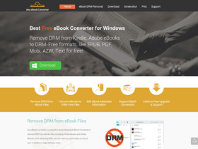
Epubor Studio is a well-regarded software company specializing in eBook conversion and management tools. Their flagship product, Epubor Ultimate, is known for its ability to seamlessly convert eBooks between various formats, such as EPUB, PDF, and Mobi, making it easier for users to read their digital books across different devices.
One of the major strengths of Epubor Ultimate is its user-friendly interface. The software is designed to be intuitive, allowing even those with minimal technical experience to navigate it with ease. Additionally, it supports a wide range of eBook formats and works well with popular eReaders like Kindle, Kobo, an
I had just found out about Epubor while searching for ways to convert an EPUB file, so it would be easier to read on my iPad, and it worked flawlessly, just the way one would want it to work. The interface is easy to use, and the conversion is very fast. I recommend.
Unfortunately all doors are closed at the moment for Kindle books with the new KFX protection. I can't move my books anymore to Kobo and avoid vendor lock n as I buy books from multiple stores. Once this is fixed I'll be happy to try the product again
Epubor 回复2025-03-06
I feel so sorry for causing you so much inconvenience.
This tool now only works on Windows computers for Kindle books backing up. Mac users are nearly unable to convert their Amazon kindle books.
We are developing on this issue. When there is a better solution, we will upgrade it.
I love how Epubor effortlessly was installed and converts my eBooks and strips DRM, giving me freedom to read anywhere with its simple interface. It keeps my books looking perfect, and I can tweak titles or batch-process my collection in no time.
This application is an absolute lifesaver! Not only does it help you get the documents you need in the right format for easy printing and reading, but it also has the simplest interface, making the process seamless. I can't recommend this product enough; it's truly the best out there!
Very handy ebook converter but does need some improvements
While ePubor Ultimate is a great piece of software, it isn't perfect but has some weaknesses.
Firstly, while you can use it to convert a variety of formats it can struggle and the guides vary in their rate of success.
The biggest issue I have with the software is that with a library of over 500 books, if I download them and want to convert the format to something else e.g. the supported MOBI format then I have to move the files all to the same folder.
For many this would be quite labour intensive though thankfully I'm able to automate most of this so I am able to work around the problem.
To get it up to 5 stars, I would say address this folder issue by allowing recursive import of ebooks (Calibre for example does this) and try to improve the conversion for some formats which has become less reliable.
Support is polite and fairly quick. I have had a few license problems for example (some of which should not have happened) but it was resolved fairly quickly.
Epubor 回复2025-02-24
Thank you for this kind review.
I will forward your suggestions to the development.
You can locate and collect your books in one folder and then set it to Epubor Ultimate "Favorite" tab by "Click to set favorite path", and then you can import your books and bulk convert them.
Epubor is amazing because it works.
It is simply magical how easy, quick, simple and fast epubor works, it was the only software capable of downloading some books from my kindle library and saving it to pdf. A book i have been trying to save it for a long time through other methods.
Epubor is also capable of saving your books in different file formats including the two most important ones (to me at least), pdf and epub.
The software is really good, i honestly recommend this software to everybody.


 BookFab
 Any Ebook-converter
 Patch Please
 Claritycheck
 Hotels.com
 Paypal
 Nexifyhost
 Oliverse